Formrio Addons for WPForms (FAWPF) is a free, modular enhancement suite designed to extend the capabilities of the WPForms form builder. It introduces a collection of additional form fields, submission management tools, and workflow integrations that help you build more capable forms without adding unnecessary complexity to your WordPress site.
Built to work with both WPForms Lite and WPForms Pro, Formrio Addons integrates directly into the familiar WPForms experience. Simply activate the addons you need from the dedicated Formrio Addons → Addons tab, and the enabled features become available in the standard WPForms form builder.
Whether you need advanced input fields, reliable submission storage, or automated notifications, Formrio Addons gives you the tools to do more with WPForms while keeping your workflow simple and familiar.
Form Fields
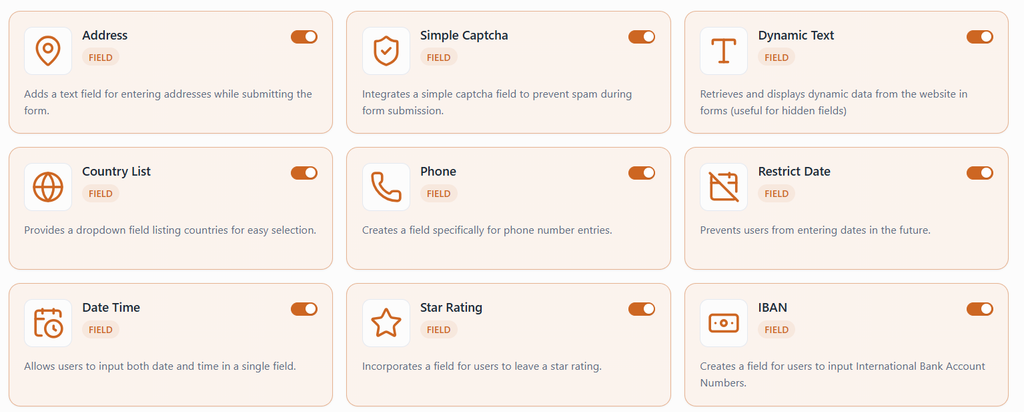
- Phone: Collect phone numbers using International, Smart, or US formats. Supports optional country detection through GeoIP and front-end phone number validation.
- Address: Collect complete postal addresses in a single field group, with US and International layout options.
- Date Time: Allow users to enter dates, times, or both, with 17+ format presets, an interactive calendar, and input masks.
- Restrict Date: Control date selection by setting minimum and maximum dates, blocking specific weekdays, and excluding individual dates.
- Country List: Let users select a country using a searchable dropdown with flags or a simple list of countries. Supports a default country.
- Star Rating: Allow visitors to rate products, services, sessions, or other items using customizable star styles and sizes.
- IBAN: Collect International Bank Account Numbers with automatic formatting to make long account numbers easier to read and enter.
- Website / URL: Collect website addresses and URLs with built-in validation to ensure the entered value is a valid URL.
- Simple Captcha: Create custom question-and-answer challenges, such as a basic math question, to help prevent automated spam submissions.
- Dynamic Text: Automatically populate fields using 25+ dynamic sources, including URL parameters, post details, user information, site data, cookies, and session values. Fields can be displayed, hidden, or disabled.
- Hidden Field: Capture information such as page URLs or user email addresses without displaying the field to visitors. Supports default values and WPForms Smart Tags.
- Honeypot: Add an invisible anti-spam field that detects bots that automatically fill in form fields and quietly rejects suspicious submissions.
- Section Divider: Organize long forms into clear sections using headings and descriptions to improve readability and navigation.
Features
- Database Entries: Store form submissions in a dedicated table within your WordPress database. View entries by form, search and filter submissions, review complete entry details, mark entries as read or unread, update statuses, delete entries individually or in bulk, and export submissions to CSV.
Integrations
- Webhooks: Send form-submission data to any URL configured by the site owner, including endpoints for Zapier, Make, Slack, or custom applications. Supports multiple named connections per form, background delivery through the WPForms task queue, and a built-in Send Test button.
- Telegram: Automatically send formatted form-submission notifications to a Telegram chat or channel. Configure a bot token obtained through @BotFather, specify the destination chat ID, and test the connection using the built-in Send Test button.
Who Can Use Formrio Addons for WPForms?
Formrio Addons for WPForms is suitable for a wide range of WordPress users who want to extend their forms with additional fields, submission management features, and workflow integrations.
- Business Owners: Collect customer information, contact details, addresses, and feedback through professional forms.
- Website Administrators: Improve existing WPForms forms with additional fields, spam protection, and better data collection options.
- Developers: Use dynamic text, hidden fields, webhooks, and other tools to build more flexible form workflows.
- E-commerce Store Owners: Collect customer details, website information, ratings, and other data relevant to their business.
- Booking and Event Organizers: Create registration forms with date and time inputs, restricted dates, and address fields.
- Marketing Professionals: Capture lead information, track page URLs, collect campaign parameters, and connect form submissions to automation tools.
- Agencies and Freelancers: Build customized forms for clients without developing additional fields from scratch.
- Customer Support Teams: Collect feedback, gather support requests, and receive form-submission notifications through Telegram.
- Organizations and Educational Institutions: Create registration, application, survey, and feedback forms while keeping submissions in their own WordPress database.
- WordPress Beginners: Extend WPForms using a familiar interface without needing to learn a separate form-building framework.